If you want to change the primary domain of your WordPress multisite installation, there are 5 values to change. There is no need to perform a database dump. This is actually frowned upon, as WordPress stores serialized data in the database, and altering it can cause corruption. Here is a list of the 5 main tables and options that need to be changed (note that we’re assuming your table prefix is “wp_”. If you’re using a different table prefix, replace “wp_” in the following table names with your prefix):
- wp_options: options named “siteurl” and “home”
- wp_site
- wp_sitemeta: the option named “siteurl”
- wp_blogs: any entries in the “domains” column that have the old domain name
- wp_#_options: Each sub-site will have sets of tables that correspond to the blog_id in the wp_blogs table. You need to go to the wp_#_options table, where # corresponds to the blog_id, and update the “siteurl” and “home” settings in that table.
In order to make these changes, you’ll need to utilize PHPMyAdmin to edit your database.
Using the above bullet points – find the necessary tables, which are pointed out below and edit the URLs to the new domain you’re wanting:

Be sure to mirror the current syntax of HTTP or nonHTTP for each table. Here are two examples below of the wp_site table using nonHTTP and wp_sitemeta using HTTP:
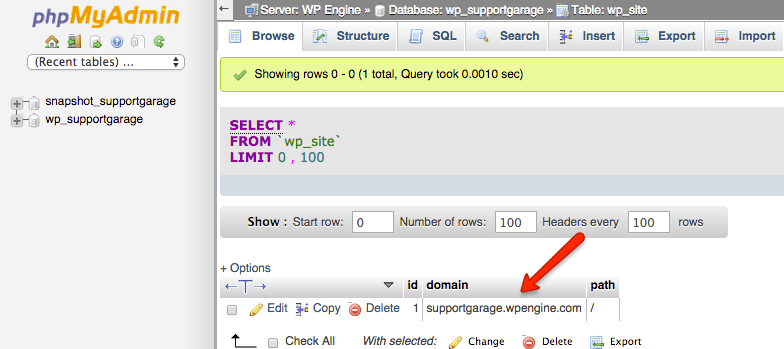
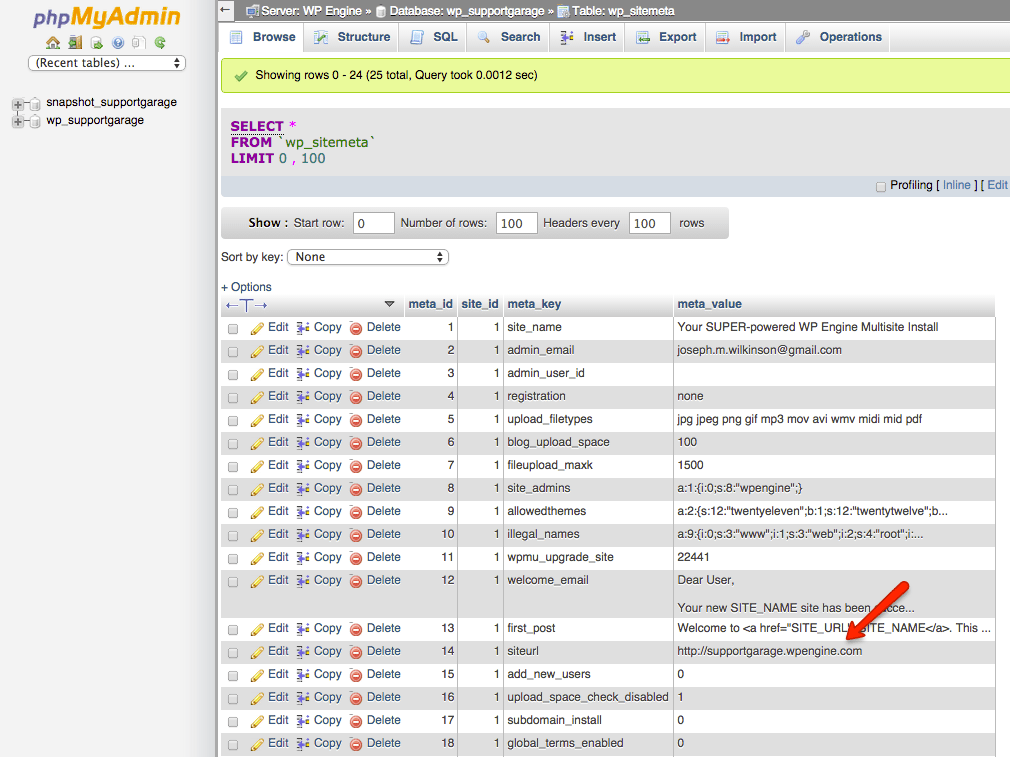
WordPress has different rules for different fields. The wp_site and wp_blogs tables can NOT have http:// or a trailing slash at the end of the domain name, whereas in the wp_options table, it is required to have the http:// at the beginning. In the wp_sitemeta table it is required to have http:// at the beginning and a trailing slash at the end.
Also make sure to comment out any pre-defined constants in your wp-config.php file, as they will override settings in the database. Things such as:
define( 'WP_HOME', 'http://example.com' );
define( 'WP_SITEURL', 'http://example.com' );
After that, we have to manually tell our servers which domain is the new primary domain. We can make this change, and push it out in under a couple of seconds.
Note: In most cases you may/will need to update a entry in your WP-Config.php file. The code I would recommend taking a look at is the code snippet here:
define('WP_ALLOW_MULTISITE', true);
define( 'MULTISITE', true );
define( 'SUBDOMAIN_INSTALL', true );
$base = '/';
define( 'DOMAIN_CURRENT_SITE', 'mysite.wpengine.com' );
define( 'PATH_CURRENT_SITE', '/' );
define( 'SITE_ID_CURRENT_SITE', 1 );
define( 'BLOG_ID_CURRENT_SITE', 1 );
On the line that has “define(‘DOMAIN_CURRENT_SITE’,’mysite.wpengine.com’);”
You will replace “mysite.wpengine.com” with your domain. So for example:
define('WP_ALLOW_MULTISITE', true);
define( 'MULTISITE', true );
define( 'SUBDOMAIN_INSTALL', true );
$base = '/';
define( 'DOMAIN_CURRENT_SITE', 'mysite.com' );
define( 'PATH_CURRENT_SITE', '/' );
define( 'SITE_ID_CURRENT_SITE', 1 );
define( 'BLOG_ID_CURRENT_SITE', 1 );